
FC 27 Premium - 24 Hours
After purchase. You will get access to loader/how to inject cheat tutorial and key license. The delivery is automatically!
Important to know: This is a Private Fifa 27 cheat and all features are 100% Working and Undetected. The price is high but you get what you pay for! + Undetected for a very long time.
Download FC 27 Premium Loader here: https://veterancheats.com/files/file/344-fc-27-premium-ea-fc-27/
Get your key from here: https://veterancheats.com/clients/purchases/
Before you buy:
Make sure you check our cheats status page before purchasing this product.
https://veterancheats.com/topic/2-cheats-status/
Requirements:
* Windows 10 (1903,1909,2004,20H2,21H1,21H2 or 22H2 All versions)
* Windows 11 (23H2,24H2 & 25H2 All Versions)
* Works with Steam, EA App
FC 27 Cheat Menu:
FC 27 Cheat Features List:
General Module
Bypass Settings
ALT-TAB Bypass
Prevents the game from pausing, disconnecting or triggering a forfeit loss when the game is minimized or loses focus through ALT-TAB. Desync Bypass
Suppresses server synchronization flags so supported match terminations register as a clean disconnection instead of triggering a “Match Under Review” investigation. AFK Bypass
Prevents automatic inactivity timeouts and kicks when idle without controller input during supported online matches. Accuracy Settings
Power Bar Override
Enables custom timing and fill calculations for power shots, passes and timed finishing. Power Bar Control
Adjusts the fill rate, speed and timing precision of shot and pass power meters. Controller Settings
Controller Master Switch
Activates the custom controller-assistance and automation overrides selected below. Auto Shots
Automatically performs contextual shots when a clear scoring opportunity is detected inside the penalty area. Auto Flair Pass
Automatically performs contextual flair passes such as backheels, rabonas and trivelas when appropriate. Auto Clearance
Automatically performs defensive clearances in dangerous situations inside your penalty area. Through Pass Assistance
Select manual, semi-assisted or assisted behavior for through passes into open space. Lobbed Pass Assistance
Control the aiming, height and power assistance applied to lofted passes. Jockey Assistance
Adjust defensive tracking, positioning and speed assistance while jockeying. Defending Type
Select the available competitive, advanced or legacy defending control system. Header Assistance
Choose manual, semi-assisted or assisted aiming for headed shots and passes. AI Settings
User Bot Difficulty
Set the difficulty level of AI-controlled players on your team. Opponent Bot Difficulty
Set the difficulty level of AI-controlled players on the opposing team. AI Play Override
Allows the AI to take autonomous control over gameplay actions and decisions. AI Co-op Play
Enables an AI-controlled cooperative partner in supported FUT modes, with selectable player index control. Match Settings
Name Hide
Hides and anonymizes in-game player names to reduce opponent identification and stream sniping. Player Information Overlay
Displays detected player usernames together with their PC, PlayStation or Xbox platform. Teleport Goal – High Risk
Teleports the ball into the opponent’s goal. This is a high-risk function and should not be treated as safe for unrestricted online use. Freeze Ball – High Risk
Freezes the ball in its current position. Using this online can cause desynchronization and force the match to disconnect. Server Module
Server and Platform Settings
Single Server Selection
Routes matchmaking through one selected game server. Custom Server Pool
Create a priority pool containing up to 15 selected servers for faster matchmaking and more flexible routing. Apply and Restore Routing
Apply the selected server route or restore the game’s original connection settings directly from the menu. Disconnect Controls
Disconnect Match
Assign a custom hotkey that forces the opponent’s current match session to terminate. Disable Opponent AI
Assigns virtual controllers to the opposing team, disabling AI-controlled movement and leaving the opponent responsible for the selected player. Lock Screen
Assign a custom hotkey that suspends the opponent’s frame rendering, freezing their display while the match continues. Bail Me Out
Assign a custom hotkey to disconnect your match session without recording a loss or penalty where supported. Matchmaking Settings
FUT Division Modifier
Adjust the active Division Rivals tier used for supported matchmaking and queue searches. FUT Draft Round Modifier
Adjust the active FUT Draft round used for tournament bracket matchmaking. Champions Win/Loss Modifier
Customize the active Champions or Weekend League win and loss values used to calculate matchmaking form. Pro Clubs League Modifier
Adjust the Pro Clubs division or playoff-round value used for league matchmaking. Team Module (Virtual Pro)
The Team module can target either the user team or the opponent team, allowing both sides to be configured independently.
Quick Team Overrides (Press F5 Before Kickoff to Apply Stats)
99 Stats
Applies maximum supported player attributes to the selected team. Five-Star Weak Foot
Applies five-star weak foot to the selected team. Five-Star Skill Moves
Applies five-star skill moves to the selected team. Unlock PlayStyles+
Applies supported golden PlayStyles+ to the selected team. Unlock Silver PlayStyles
Applies supported standard PlayStyles to the selected team. User and Opponent Team Slider Editor (Press F5 Before Kickoff to Apply Stats)
Pace and Physical
Customize sprint speed, acceleration, jog dribbling, sprint dribbling, controlled-sprint dribbling, physicality, regular jockey speed, sprint jockey speed, injury frequency and injury severity. Shooting
Customize regular, finesse, chip, low-driven, power and headed-shot accuracy, speed, height and error values. Passing and Ball Control
Customize ground passes, through passes, lobbed passes, lobbed through balls, crosses, headed passes and first-touch control. Defending and Goalkeeping
Customize interception success, tackle assistance, goalkeeper deflections, ball deflections and overall goalkeeper ability. Positioning and Tactics
Customize marking, attacking-run frequency, line length, line width, line height and fullback positioning. AI Gameplay Tendencies
Customize defensive aggression, build-up speed, standing tackles, sliding tackles, professional fouls, skill moves, shooting behavior, crossing, first-time passing and dribbling frequency. Independent Targeting
Apply different attributes and gameplay behavior to your team and the opposing team rather than using one global set of values. Virtual Pro Module (Press F5 Before Kickoff to Apply Stats)
Individual Player Editor
Individual Player Selection
Select any detected player or Virtual Pro in the current match from either the home or away team. Selected VPro Targeting
Apply attributes, sliders and PlayStyles to the selected Virtual Pro instead of changing the entire team. Full Attribute Editor
Customize acceleration, sprint speed, positioning, finishing, shot power, long shots, volleys, penalties, vision, crossing, free-kick accuracy, passing, curve, agility, balance, reactions, ball control, dribbling, composure, interceptions, heading, defensive awareness, tackling, jumping, stamina, strength, aggression and goalkeeper attributes. Skill Moves and Weak Foot
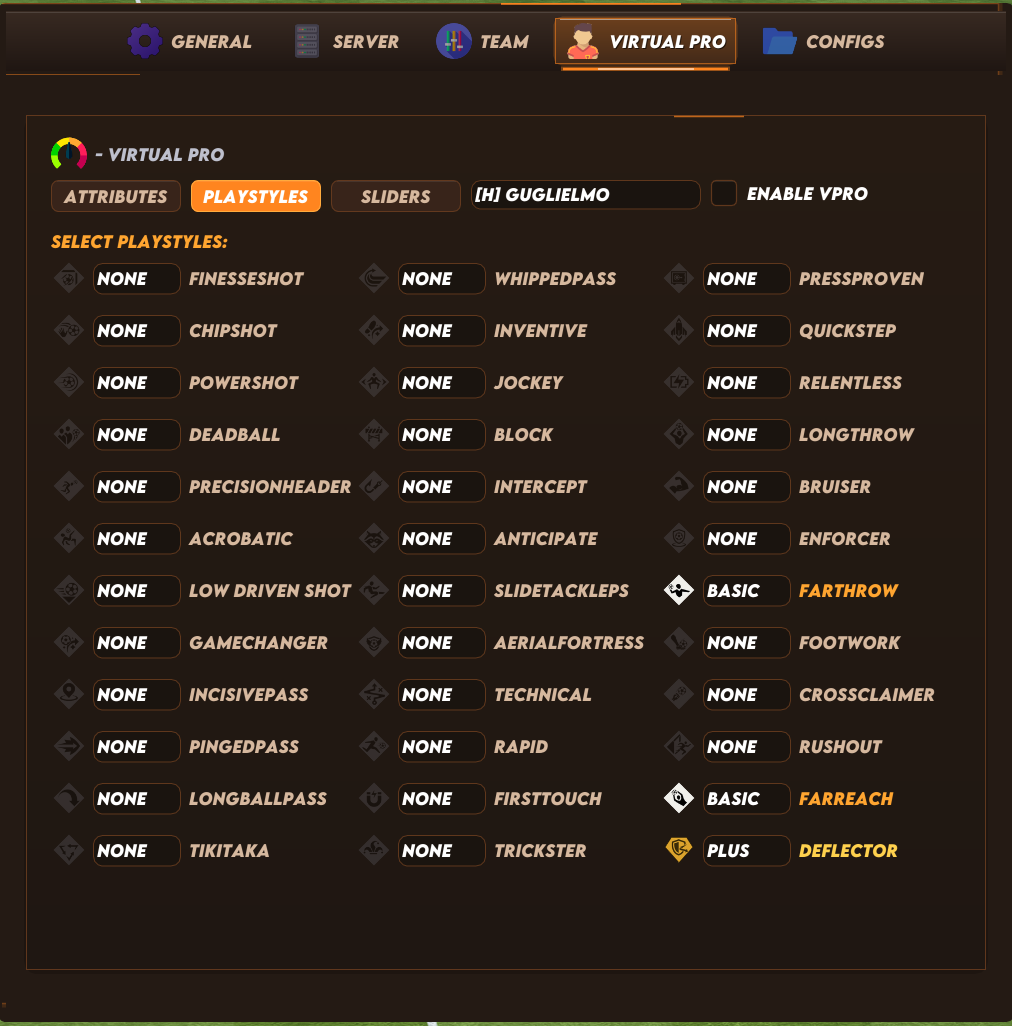
Independently assign one-star through five-star skill moves and weak foot to the selected player. Individual PlayStyle Editor
Configure each available PlayStyle independently as None, Basic or PlayStyle+ for the selected player. Individual Gameplay Sliders
Customize sprint speed, acceleration, shot error, pass error, pass speed, shot speed, injury frequency, injury severity, first touch, header accuracy, tackle assistance, interception behavior and ball deflection for the selected player. Automatic Player Sync
Loads the selected player’s existing attributes, skill moves, weak foot and PlayStyles into the editor before changes are applied. Configs Module
Configuration and Appearance
Save Configuration
Save the current menu setup to your clipboard for later use or sharing. Load Configuration
Restore a previously saved menu configuration directly from your clipboard. Built-In Theme Presets
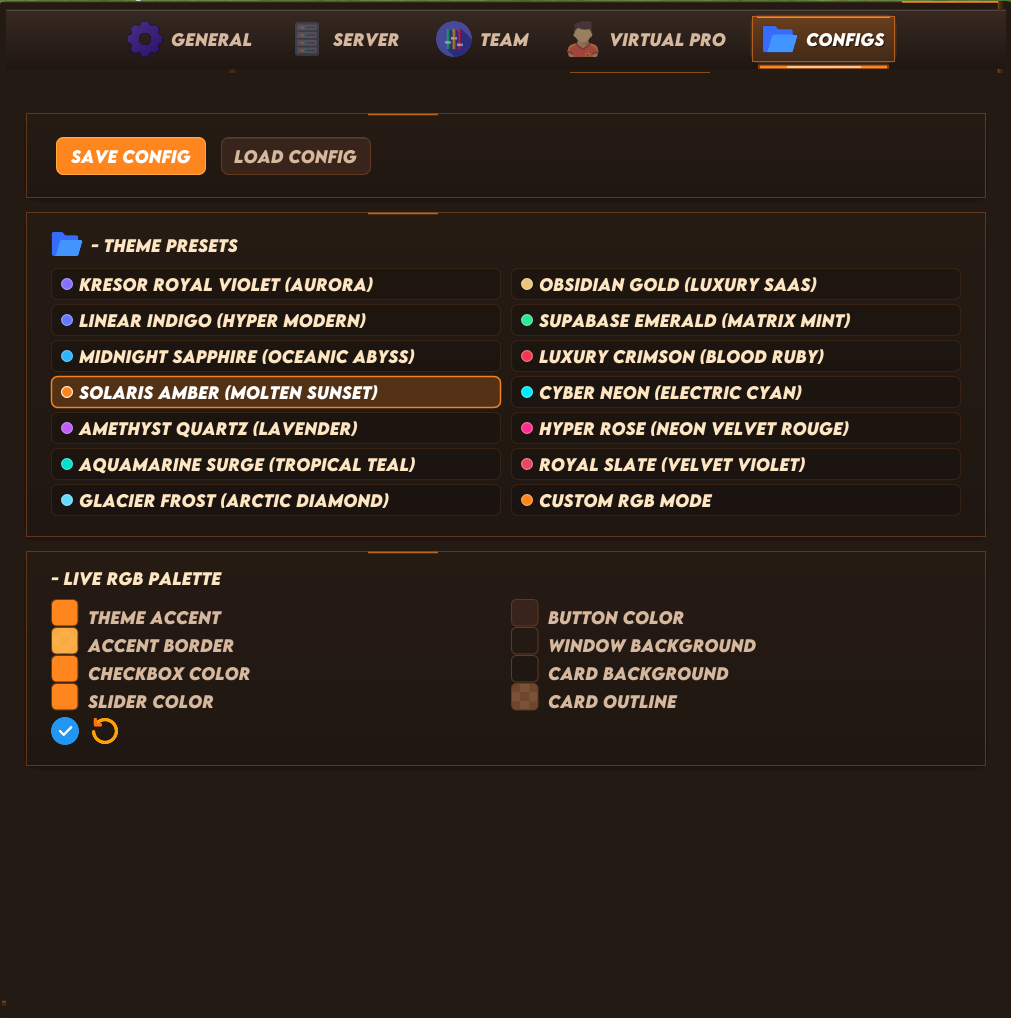
Choose from 13 included visual themes or use the Custom RGB mode. Live RGB Customization
Customize the theme accent, border, checkbox, slider, button, window, card and outline colors. Apply or Restore Theme
Apply custom appearance settings instantly or restore the default theme.
FC 27 Premium - Video:
About FC 27 Premium - 24 Hours
IMPORTANT: NVIDIA Graphics Only – do not buy if you have an AMD graphics card. Only Nvidia GPUs are supported at this time.
After purchase. You will get access to loader/how to inject cheat tutorial and key license. The delivery is automatically!
Important to know: This is a Private Fifa 27 cheat and all features are 100% Working and Undetected. The price is high but you get what you pay for! + Undetected for a very long time.
Download FC 27 Premium Loader here: https://veterancheats.com/files/file/344-fc-27-premium-ea-fc-27/
Get your key from here: https://veterancheats.com/clients/purchases/
Before you buy:
Make sure you check our cheats status page before purchasing this product.
https://veterancheats.com/topic/2-cheats-status/
Requirements:
* Windows 10 (1903,1909,2004,20H2,21H1,21H2 or 22H2 All versions)
* Windows 11 (23H2,24H2 & 25H2 All Versions)
* Works with Steam, EA App
FC 27 Cheat Menu:
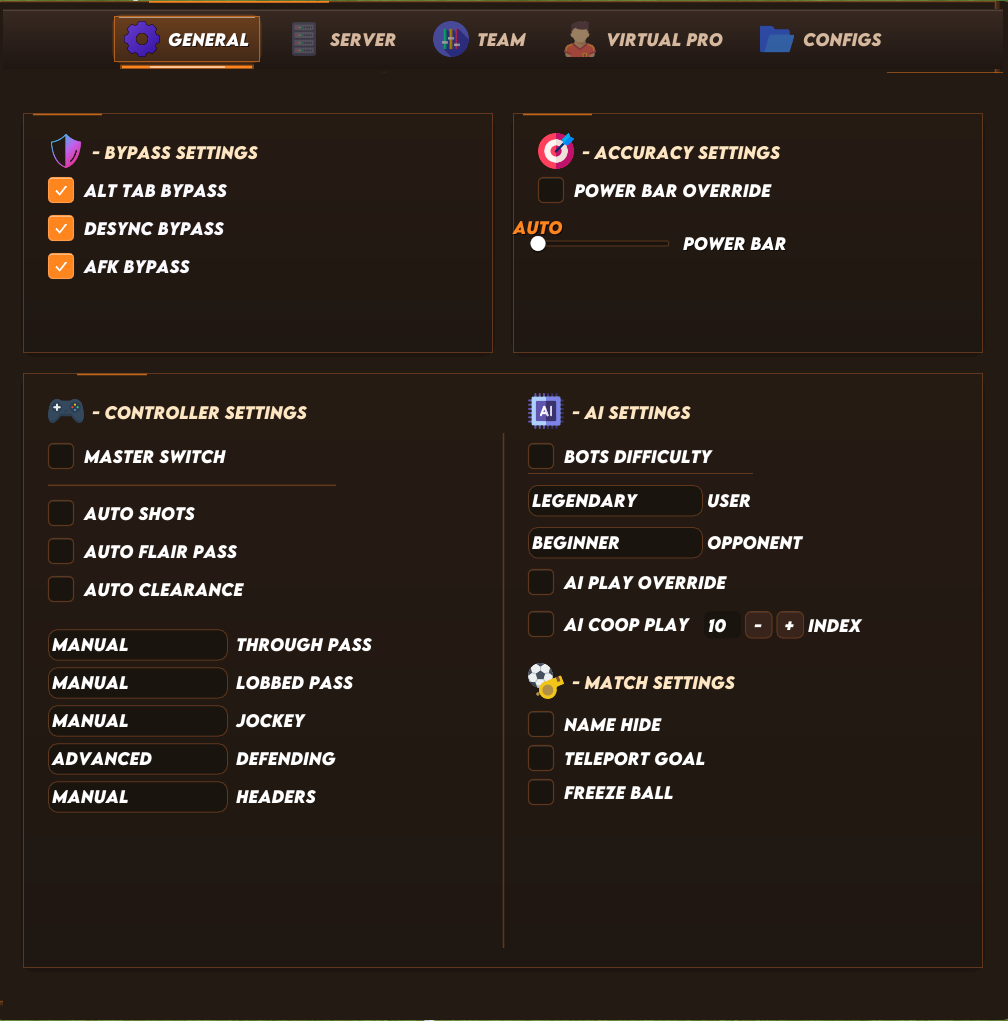
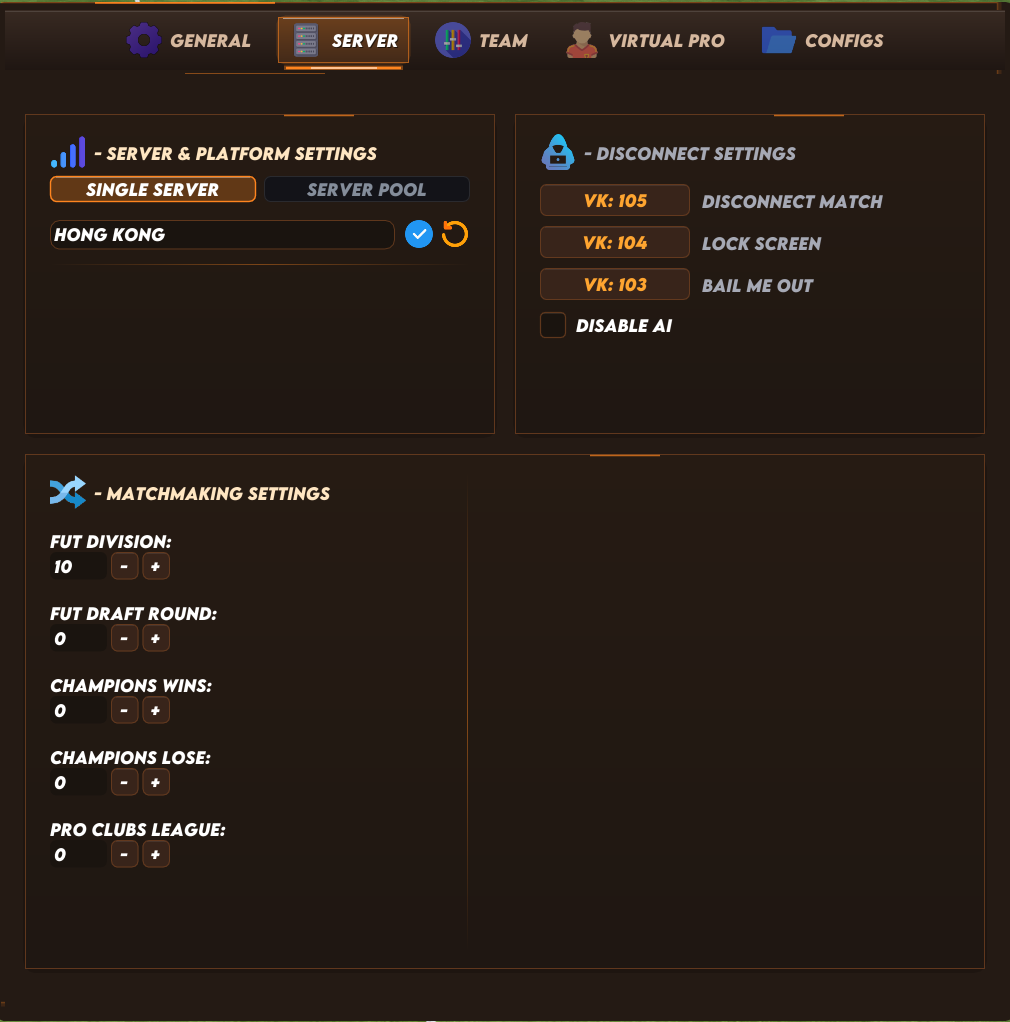
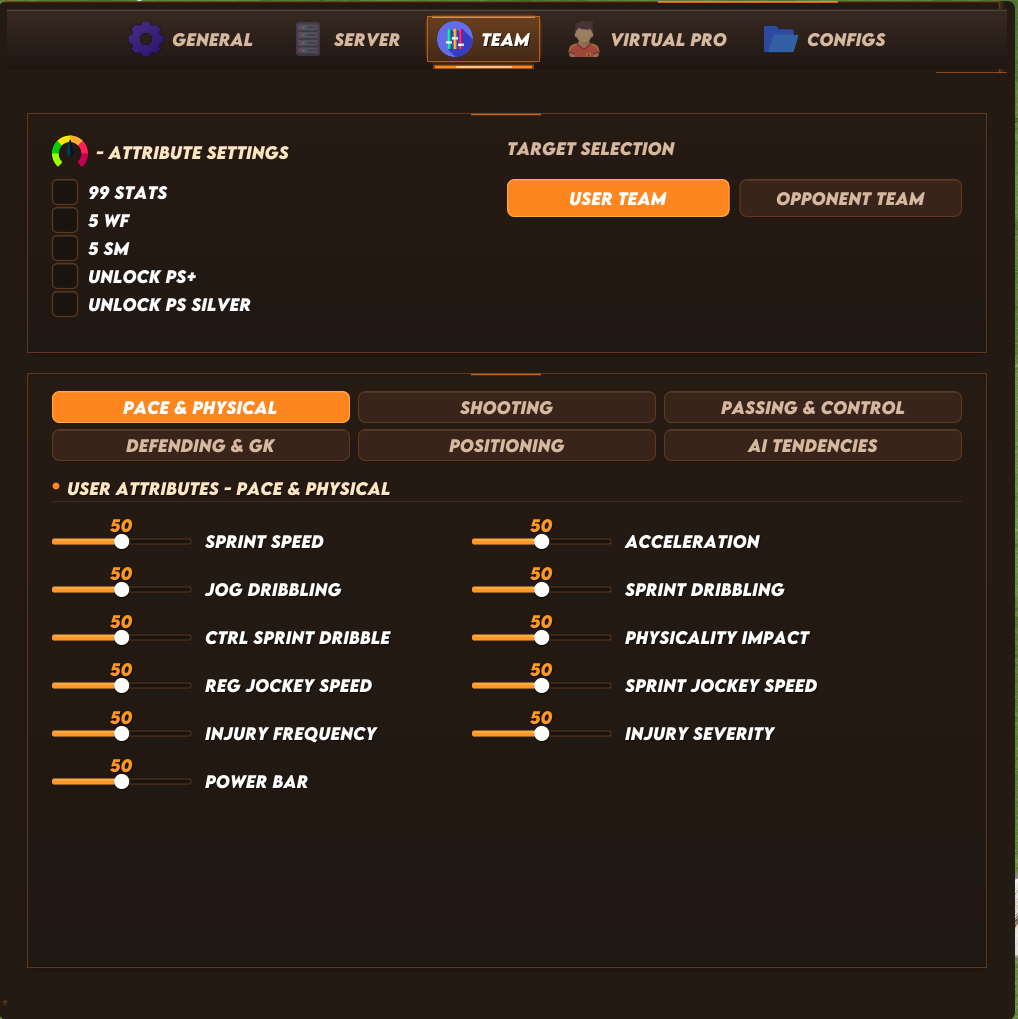
FC 27 Cheat Features List:
General Module
Bypass Settings
-
ALT-TAB Bypass
Prevents the game from pausing, disconnecting or triggering a forfeit loss when the game is minimized or loses focus through ALT-TAB. -
Desync Bypass
Suppresses server synchronization flags so supported match terminations register as a clean disconnection instead of triggering a “Match Under Review” investigation. -
AFK Bypass
Prevents automatic inactivity timeouts and kicks when idle without controller input during supported online matches.
Accuracy Settings
-
Power Bar Override
Enables custom timing and fill calculations for power shots, passes and timed finishing. -
Power Bar Control
Adjusts the fill rate, speed and timing precision of shot and pass power meters.
Controller Settings
-
Controller Master Switch
Activates the custom controller-assistance and automation overrides selected below. -
Auto Shots
Automatically performs contextual shots when a clear scoring opportunity is detected inside the penalty area. -
Auto Flair Pass
Automatically performs contextual flair passes such as backheels, rabonas and trivelas when appropriate. -
Auto Clearance
Automatically performs defensive clearances in dangerous situations inside your penalty area. -
Through Pass Assistance
Select manual, semi-assisted or assisted behavior for through passes into open space. -
Lobbed Pass Assistance
Control the aiming, height and power assistance applied to lofted passes. -
Jockey Assistance
Adjust defensive tracking, positioning and speed assistance while jockeying. -
Defending Type
Select the available competitive, advanced or legacy defending control system. -
Header Assistance
Choose manual, semi-assisted or assisted aiming for headed shots and passes.
AI Settings
-
User Bot Difficulty
Set the difficulty level of AI-controlled players on your team. -
Opponent Bot Difficulty
Set the difficulty level of AI-controlled players on the opposing team. -
AI Play Override
Allows the AI to take autonomous control over gameplay actions and decisions. -
AI Co-op Play
Enables an AI-controlled cooperative partner in supported FUT modes, with selectable player index control.
Match Settings
-
Name Hide
Hides and anonymizes in-game player names to reduce opponent identification and stream sniping. -
Player Information Overlay
Displays detected player usernames together with their PC, PlayStation or Xbox platform. -
Teleport Goal – High Risk
Teleports the ball into the opponent’s goal. This is a high-risk function and should not be treated as safe for unrestricted online use. -
Freeze Ball – High Risk
Freezes the ball in its current position. Using this online can cause desynchronization and force the match to disconnect.
Server Module
Server and Platform Settings
-
Single Server Selection
Routes matchmaking through one selected game server. -
Custom Server Pool
Create a priority pool containing up to 15 selected servers for faster matchmaking and more flexible routing. -
Apply and Restore Routing
Apply the selected server route or restore the game’s original connection settings directly from the menu.
Disconnect Controls
-
Disconnect Match
Assign a custom hotkey that forces the opponent’s current match session to terminate. -
Disable Opponent AI
Assigns virtual controllers to the opposing team, disabling AI-controlled movement and leaving the opponent responsible for the selected player. -
Lock Screen
Assign a custom hotkey that suspends the opponent’s frame rendering, freezing their display while the match continues. -
Bail Me Out
Assign a custom hotkey to disconnect your match session without recording a loss or penalty where supported.
Matchmaking Settings
-
FUT Division Modifier
Adjust the active Division Rivals tier used for supported matchmaking and queue searches. -
FUT Draft Round Modifier
Adjust the active FUT Draft round used for tournament bracket matchmaking. -
Champions Win/Loss Modifier
Customize the active Champions or Weekend League win and loss values used to calculate matchmaking form. -
Pro Clubs League Modifier
Adjust the Pro Clubs division or playoff-round value used for league matchmaking.
Team Module (Virtual Pro)
The Team module can target either the user team or the opponent team, allowing both sides to be configured independently.
Quick Team Overrides (Press F5 Before Kickoff to Apply Stats)
-
99 Stats
Applies maximum supported player attributes to the selected team. -
Five-Star Weak Foot
Applies five-star weak foot to the selected team. -
Five-Star Skill Moves
Applies five-star skill moves to the selected team. -
Unlock PlayStyles+
Applies supported golden PlayStyles+ to the selected team. -
Unlock Silver PlayStyles
Applies supported standard PlayStyles to the selected team.
User and Opponent Team Slider Editor (Press F5 Before Kickoff to Apply Stats)
-
Pace and Physical
Customize sprint speed, acceleration, jog dribbling, sprint dribbling, controlled-sprint dribbling, physicality, regular jockey speed, sprint jockey speed, injury frequency and injury severity. -
Shooting
Customize regular, finesse, chip, low-driven, power and headed-shot accuracy, speed, height and error values. -
Passing and Ball Control
Customize ground passes, through passes, lobbed passes, lobbed through balls, crosses, headed passes and first-touch control. -
Defending and Goalkeeping
Customize interception success, tackle assistance, goalkeeper deflections, ball deflections and overall goalkeeper ability. -
Positioning and Tactics
Customize marking, attacking-run frequency, line length, line width, line height and fullback positioning. -
AI Gameplay Tendencies
Customize defensive aggression, build-up speed, standing tackles, sliding tackles, professional fouls, skill moves, shooting behavior, crossing, first-time passing and dribbling frequency. -
Independent Targeting
Apply different attributes and gameplay behavior to your team and the opposing team rather than using one global set of values.
Virtual Pro Module (Press F5 Before Kickoff to Apply Stats)
Individual Player Editor
-
Individual Player Selection
Select any detected player or Virtual Pro in the current match from either the home or away team. -
Selected VPro Targeting
Apply attributes, sliders and PlayStyles to the selected Virtual Pro instead of changing the entire team. -
Full Attribute Editor
Customize acceleration, sprint speed, positioning, finishing, shot power, long shots, volleys, penalties, vision, crossing, free-kick accuracy, passing, curve, agility, balance, reactions, ball control, dribbling, composure, interceptions, heading, defensive awareness, tackling, jumping, stamina, strength, aggression and goalkeeper attributes. -
Skill Moves and Weak Foot
Independently assign one-star through five-star skill moves and weak foot to the selected player. -
Individual PlayStyle Editor
Configure each available PlayStyle independently as None, Basic or PlayStyle+ for the selected player. -
Individual Gameplay Sliders
Customize sprint speed, acceleration, shot error, pass error, pass speed, shot speed, injury frequency, injury severity, first touch, header accuracy, tackle assistance, interception behavior and ball deflection for the selected player. -
Automatic Player Sync
Loads the selected player’s existing attributes, skill moves, weak foot and PlayStyles into the editor before changes are applied.
Configs Module
Configuration and Appearance
-
Save Configuration
Save the current menu setup to your clipboard for later use or sharing. -
Load Configuration
Restore a previously saved menu configuration directly from your clipboard. -
Built-In Theme Presets
Choose from 13 included visual themes or use the Custom RGB mode. -
Live RGB Customization
Customize the theme accent, border, checkbox, slider, button, window, card and outline colors. -
Apply or Restore Theme
Apply custom appearance settings instantly or restore the default theme.
FC 27 Premium - Video: